Description
Replace text in one or more columns.
Examples
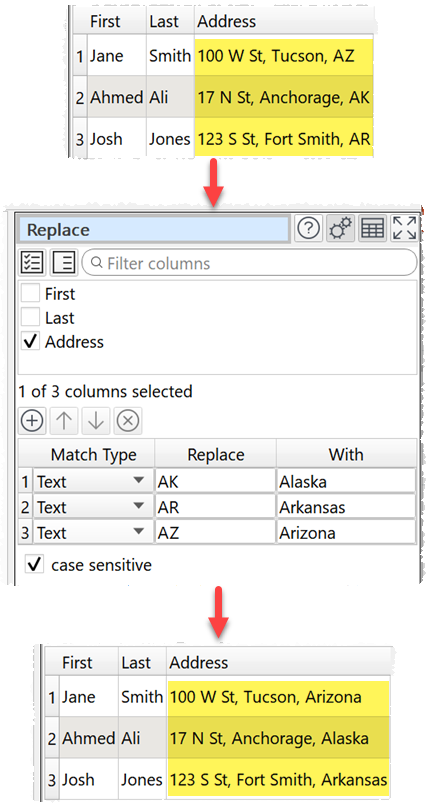
Replacing US state initials:
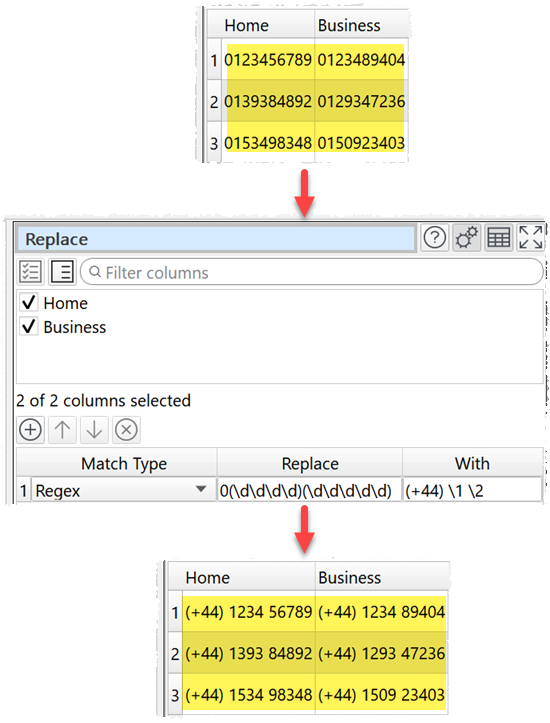
Reformatting phone numbers using a regular expression:
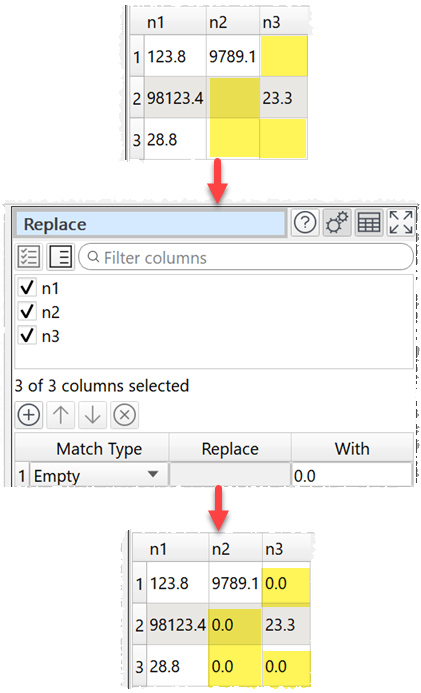
Replacing empty values:
Inputs
One.
Options
•Check the column(s) you wish to transform.
•Add the terms you wish to replace and how you wish to replace them.
oChoose the Match type as:
▪Text to replace matches contained in the text.
▪Exact text to replace the text only if it matches exactly (whitespace sensitive).
▪Regex to match using a Regular expression.
▪Empty to match empty cells (cells with whitespace are not empty).
oIn Replace put the text you want to replace for Text, Exact text or Regex matching. You can use a column variable.
oIn With put the text you want to replace it with. You can use a column variable.
•Check case sensitive to use case sensitive matching for Text, Exact text or Regex matching.
Notes
•
•Comparisons are whitespace sensitive. You can use Whitespace to remove whitespace before replacing.