You can perform the same set of transforms on multiple inputs in one operation using batch processing or command line arguments.
Example
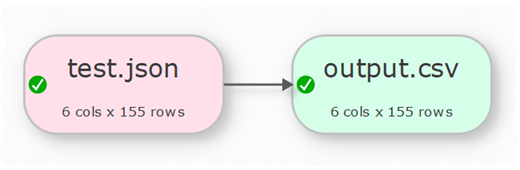
To convert a folder full of .json files to .csv files:
1.Select File>New to create a new .transform file.
2.Drag one of the .json files onto the Center pane. Ensure the options (encoding etc) are correct in the Right pane.
3.Click on the To File button at the bottom of the Left pane and set the location of a .csv file to create. Ensure the options (encoding etc) are correct in the Right pane.
4.Select File>Batch Process.
5.In the Batch Process window change the .json file name to *.json, so that all the .json files in that folder will be processed.
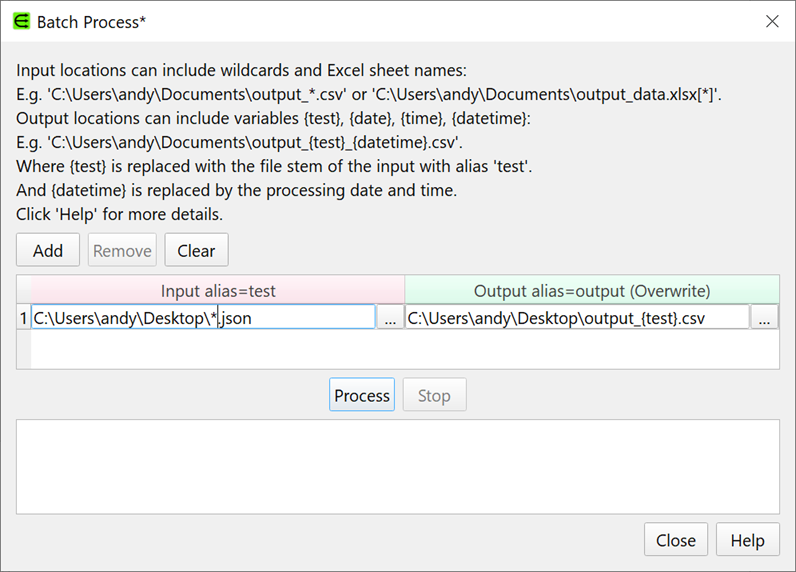
6.Press the Process button. A .csv file will now be created for each .json file in the folder. In the example above the {test} file name variable will be replaced by the file name of the input file with alias test (if you just output to output.csv then you would be continually overwriting the same file).
7.Select File>Save to save your .transform for future use.
If you want to process input files from another folder then click Add to add a new row and change the input folder.
See also: