Description
Perform various list operations on a column of delimited values.
Examples
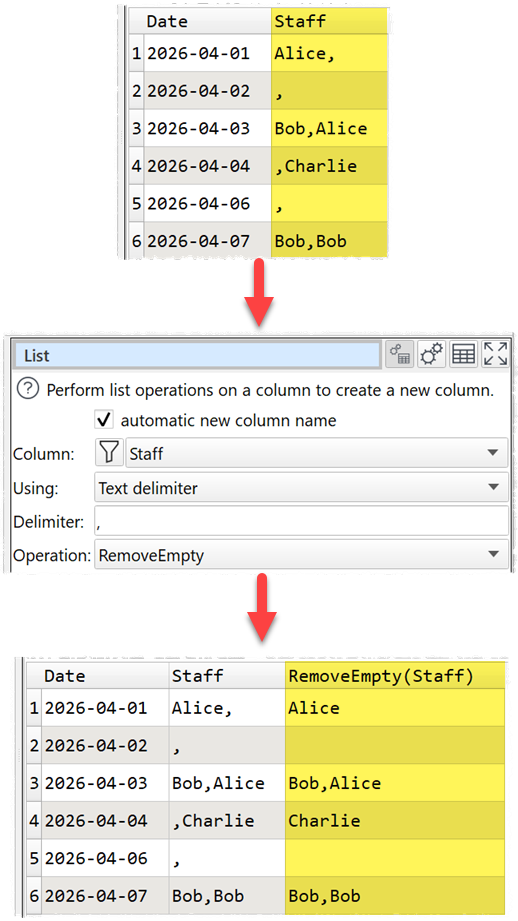
Remove empty list items:
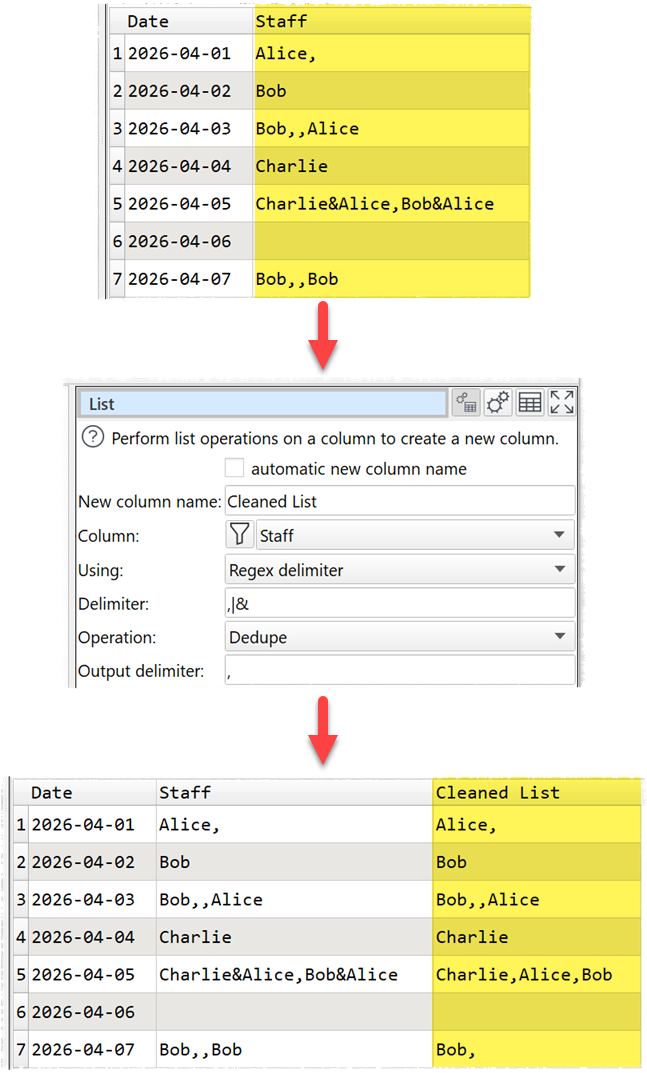
Deduplicate names in a list delimited by , (Comma) and & (Ampersand):
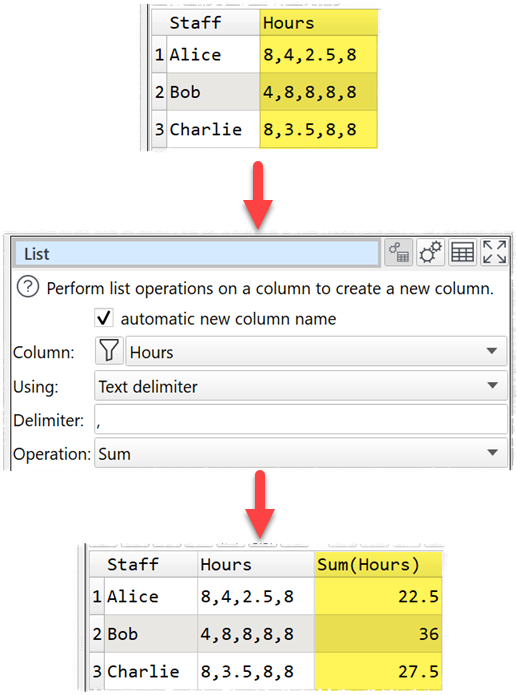
Sum a list of hours:
Inputs
One.
Options
•Uncheck automatic new column name to set a name for the newly created column in New column name.
•Select the Column you wish to perform the list operation on.
•Set Using depending on whether you wish to split using a Text delimiter (usually a single character) or a Regex delimiter.
•Set the Delimiter to the list delimiter. E.g. , (Comma).
•Set Operation to the list operation you wish to perform.
•Set Output delimiter for the delimiter to use in the new column. Required when Using is set to Regex delimiter and a list is output.
Notes
•The following operations are supported:
Operation |
Notes |
Examples (delimiter=,) |
|---|---|---|
Average |
The arithmetic mean of numeric values in the list. Non-numeric and empty items are ignored. N/A is returned if no numeric items. |
Average ( 1.0,,3.5,x ) = 2.25 |
Count |
Count items in the list. |
Count( A,B,C,C ) = 4 |
CountDistinct |
Count distinct items in the list. |
CountDistinct( A,B,C,C ) = 3 |
Dedupe |
Remove duplicates so that each list item only occurs once. All items are treated as text. |
Dedupe( A,B,C,C ) = A,B,C |
First |
The first item in the list. |
First( A,B,C,C ) = A |
Last |
The first last in the list. |
Last( A,B,C,C ) = C |
Maximum |
The maximum numeric value in the list. Non-numeric and empty items are ignored. N/A is returned if no numeric items. |
Maximum( 3.5,,1.8,-1.0,x ) = 3.5 |
Median |
The median of numeric values in the list. Non-numeric and empty items are ignored. N/A is returned if no numeric items. |
Median ( 1,2,4,8,16 ) = 4 |
Minimum |
The minimum numeric value in the list. Non-numeric and empty items are ignored. N/A is returned if no numeric items. |
Minimum( 3.5,,1.8,-1.0,x ) = -1 |
Product |
The product of numeric values in the list. Non-numeric and empty items are ignored. N/A is returned if no numeric items. |
Product ( 1,2,3,,x,4 ) = 24 |
RemoveEmpty |
Remove any items in the list. Items containing whitespace are not empty. |
RemoveEmpty( A,,B,,C,C ) = A,B,C,C |
RemoveEven |
Remove even numbered items (items 2,4,6 etc). |
RemoveEven( A,B,C,D ) = A,C |
RemoveFirst |
Removes the first item in the list. |
RemoveFirst( A,B,C,C ) = B,C,C |
RemoveLast |
Removes the first last in the list. |
RemoveLast( A,B,C,C ) = A,B,C |
RemoveOdd |
Remove odd numbered items (items 1,3,5 etc). |
RemoveOdd( A,B,C,D ) = B,D |
ReverseItems |
Reverse the order of each item in the list. |
ReverseItems( AB,C,,DE ) = BA,C,,ED |
ReverseOrder |
Reverse the order of items in the list. |
ReverseOrder( AB,C,,DE ) = DE,C,,AB |
SortAscending |
Sort the list items in ascending alphabetical order. |
SortAscending ( C,B,A,C ) = A,B,C,C |
SortDescending |
Sort the list items in descending alphabetical order. |
SortDescending ( C,B,A,C ) = C,C,B,A |
Sum |
The sum of numeric values in the list. Non-numeric and empty items are ignored. |
Sum( 1.1,x,,2.2 ) = 3.3 |
Tidy |
Trim, RemoveEmpty, Dedupe and SortAscending. |
Tidy( C,A, B,A,C ) = A,B,C |
Trim |
Remove leading and trailing whitespace from each list element. |
Trim( A, B ,C ) = A,B,C |
•List operations are sensitive to case and whitespace.
•List elements cannot contain the list delimiter (there is no escaping of delimiters).
•An empty value is treated as a list with a single, empty list item.
•To split a column by Carriage Returns or Tabs set Using to Regex delimiter and set Delimiter to \n or \t, respectively.
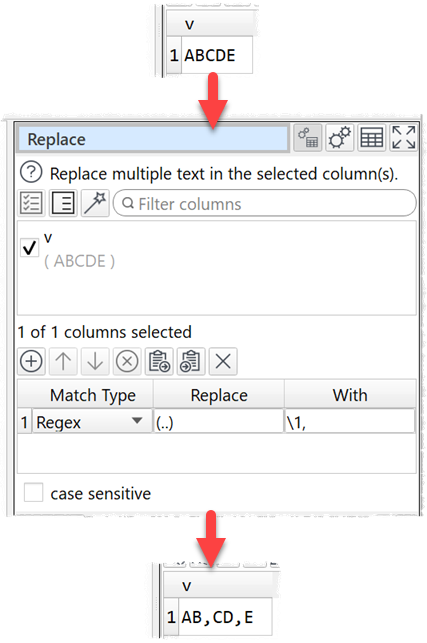
•You can convert text to a list using Replace:
See also