Multiple different forms of copying are supported in Easy Data Transform.
Feature |
Description |
Available |
|---|---|---|
Copy |
Copies selected items and connections to the clipboard, ready to Paste to the same or different .transform files. |
Main and Center pane right click menus. |
Cut |
Same as Copy, but also deletes the selected items and connections from the current .transform file. |
Main and Center pane right click menus. |
Copy Dataset |
Copies the dataset from a single selected item to the clipboard. Format can be CSV, TSV or plain text, depending on Preferences>General>Copy data to clipboard text/plain as. You can Input>From Clipboard to create a new Input item from this data. |
Center pane right click menu and Right pane buttons. |
Copy Data Values |
Copies the selected data value cells to the clipboard. |
Data table right click menu. |
Duplicate Branch |
Makes a duplicate of the selected item, and all items downstream of it, in the current .transform file. |
Center pane right click menu. |
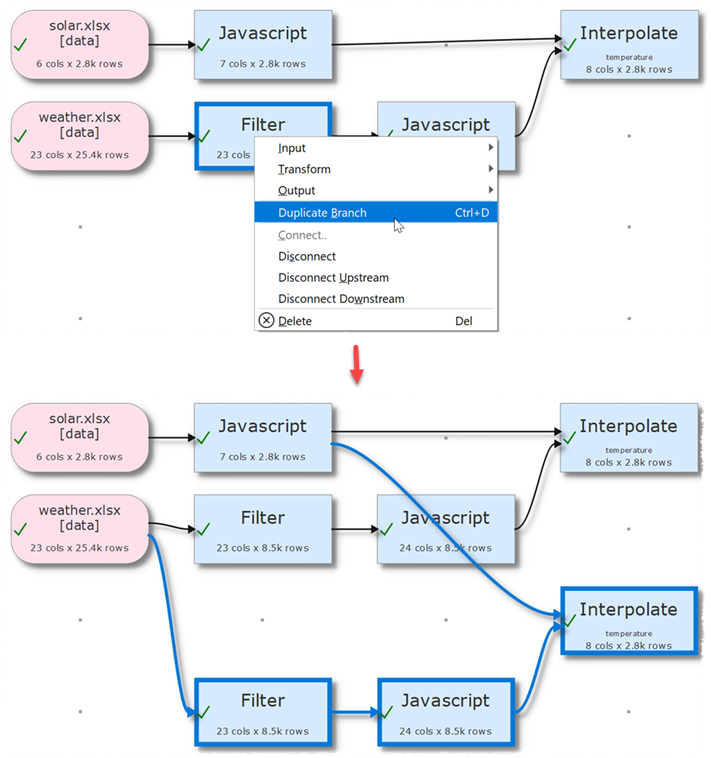
Duplicating a branch.
You can copy a whole .transform file using File>Save As.