Datetimes often need to be converted to UTC (Coordinated Universal Time, also known as Zulu time) for standardization. For example when you have timestamps created in different timezones.
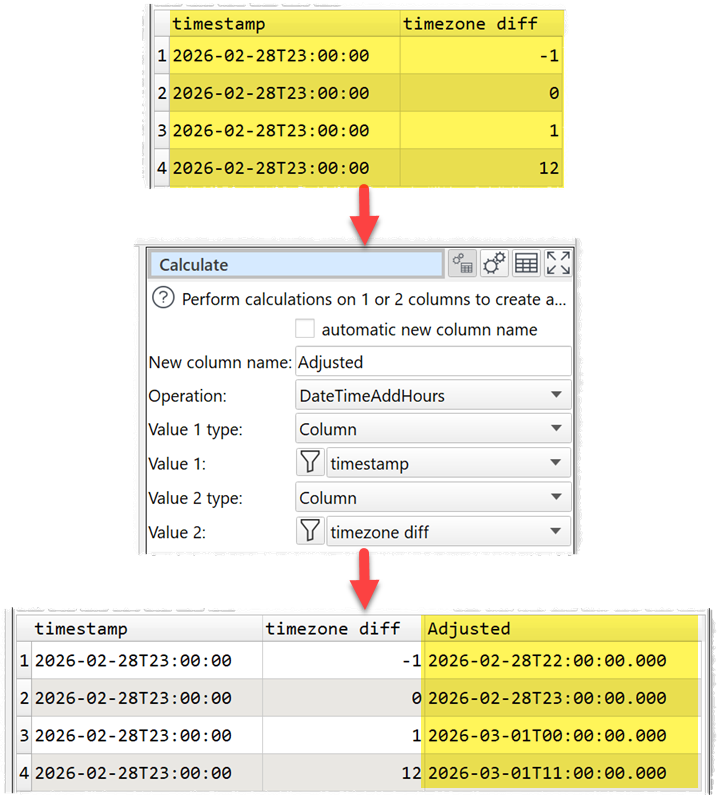
To add timezone offsets to a column of datetimes, use the DateTimeAddHours operation in the Calculate transform:
If you want to add a Z character to the end of the datetimes, to show they are in the UTC time zone, use the Insert transform.
If you need to lookup the offset values in another dataset, use the Lookup transform.
If the UTC offset is embedded with the column of datetime values, use the DateTimeToUTC operation in the Calculate transform:

Note that datetimes without a ‘Z’ or UTC offset are assumed to be in your local timezone (as set on your computer).
You can do all this offline. You do not need an Internet connection and your data stays private on your computer.
See the video above for more details.
Easy Data Transform can also help with cleaning, filtering, merging, re-shaping and analysing your data. All without coding. It can easily handle datasets with millions of rows and thousands of columns and your data never has to leave your computer. Download the free trial for Windows or Mac and try it yourself.
 Windows Download
 Mac Download