This production release adds enhancements and bug fixes to Easy Data Transform v2.11.0.
You will require a v2 license to use this release after the free trial has expired. You can buy a new license key here or, if you have a v1 license key, you can buy a discounted upgrade here. See also our upgrade FAQ.
We recommend that you back-up important .transform files before installing any new release.
Please let us know of any problems or issues you encounter with the release.
The download links are at the bottom of the page.
System requirements
Windows: 64 bit Windows 11/10/8/7 (Intel processor) or 64 bit Windows 11 (ARM processor).
Mac: macOS 26 to 10.13 (Universal Binary for ARM M series or Intel processors).
Compatibility
This version can read .transform files saved in all previous versions.
All Editions
Windows and Mac
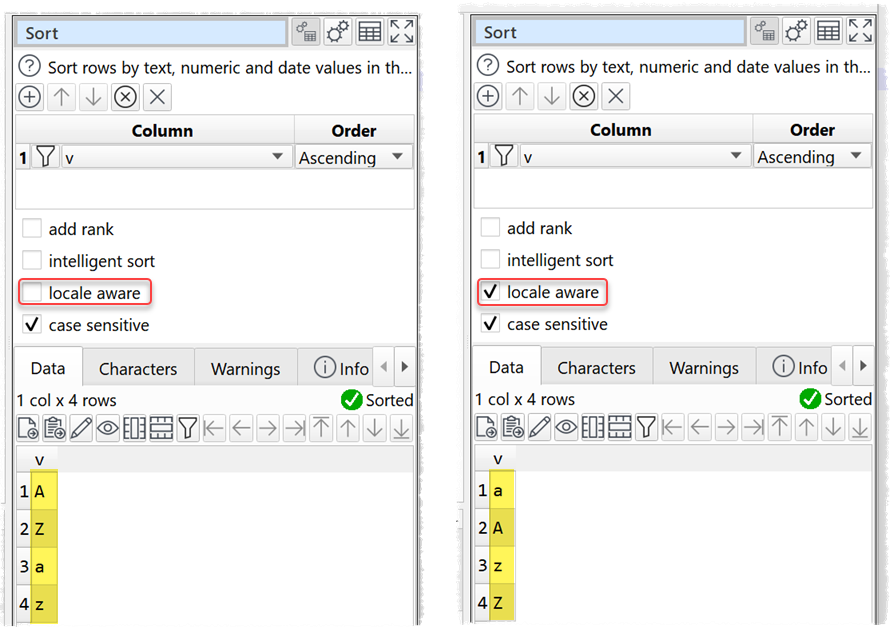
1. There is now a case sensitive option in the Sort transform when locale aware is checked. Note that the case sensitive sort order can be different with locale aware checked, depending on your locale.
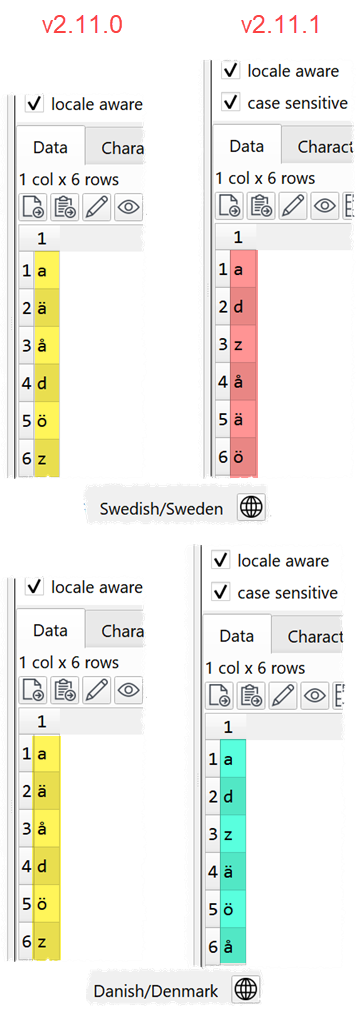
2. Fixed an issue where the Sort transform did not always sort correctly when locale aware was checked. Note that this means the sort order can change between v2.11.0 and v2.11.1 with when locale aware is checked.
3. When Output items are duplicated, the default file location is set empty to avoid using the same location as other outputs.
4. Fixed a bug that sometimes caused zooming out of the Center pane after Undo or Redo.
5. Messages displayed in the Warnings and Info tabs and output to the command line have been tidied up.
Mac only
6. The All files wildcard for browsing files has been changed from ’*.*’ to ’*‘. Thanks to @Monotone94 for the suggestion.
7. A couple of customers on macOS 26 have reported that buttons are appearing square, rather than rounded. We haven’t got to the bottom of this yet.
Advanced Edition only
Windows and Mac
8. Previously Chart items did not correctly handle the case where text X axis values had duplicate values. Duplicate X values (case sensitive) of type text are now automatically summed for the following chart types:
- vertical bar
- horizontal bar
- pie
- donut
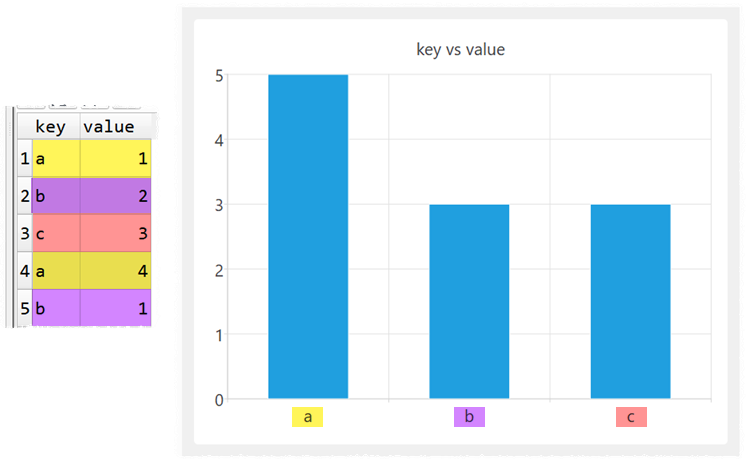
Duplicate X values (case sensitive) of type text cause the following chart types not to be drawn:
- scatter
- line
- smooth line
- area
You can avoid duplicates by using a Count transform.
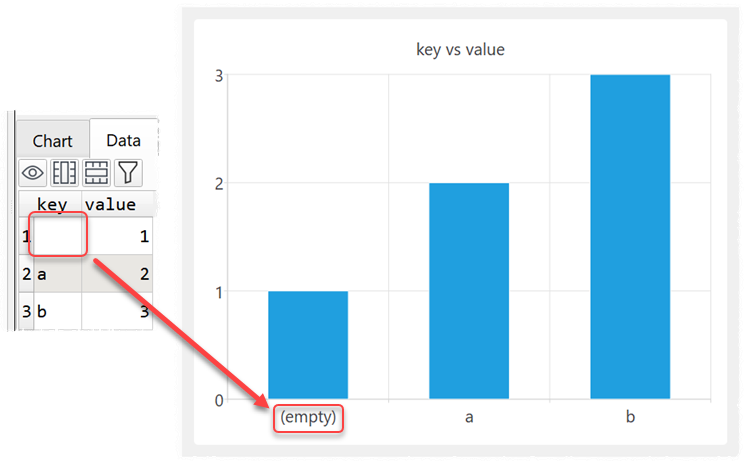
9. Previously Chart items did not correctly handle the case where text X axis values were empty. This is now fixed. Empty text X axis values are now shown as (empty) in the chart.
10. Previously the Y axis could look different on different facets when same range all facets was checked. This is now fixed.
11. For the following types of Chart item you are now warned if numerical X axis values are not ordered in an ascending or descending sequence:
- line
- smooth line
- area
12. If Legend is set to Automatic for a Chart item and less than 2 columns are selected in Y axis data, the legend will be hidden.
13. When Chart items are duplicated, the default file location is set empty to avoid using the same location as other charts. Thanks to Olaf W. for the suggestion.
14. Charts now default to use ‘nice’ values. Thanks to @Monotone94 for the suggestion.
15. Better handling of the edge case in Chart items where:
- the X axis values are text; and
- all the Y axis values are 0; and
- the X Axis Minimum and Maximum are Automatic
Thanks to Olaf W. for reporting this.
 Windows Download
 Mac Download