This production release adds enhancements and bug fixes to Easy Data Transform v2.13.0.
You will require a v2 license to use this release after the free trial has expired. You can buy a new license key here or, if you have a v1 license key, you can buy a discounted upgrade here. See also our upgrade FAQ.
We recommend that you back-up important .transform files before installing any new release.
Please let us know of any problems or issues you encounter with the release.
The download links are at the bottom of the page.
System requirements
Windows: 64 bit Windows 11/10/8/7 (Intel processor) or 64 bit Windows 11 (ARM processor).
Mac: macOS 26 to 10.13 (Universal Binary for ARM M series or Intel processors).
Compatibility
This version can read .transform files saved in all previous versions.
All Editions
Windows and Mac
1. You can now input multiple files as a single dataset. This powerful new feature allows you to stack hundreds of files or Excel sheets from a hierarchy of folders, without having to specify the individual files/sheets.
To input a folder:
- Drag a folder onto the Center pane; or
- Click From Folder in the Left pane.
The Folder To Input window will appear.
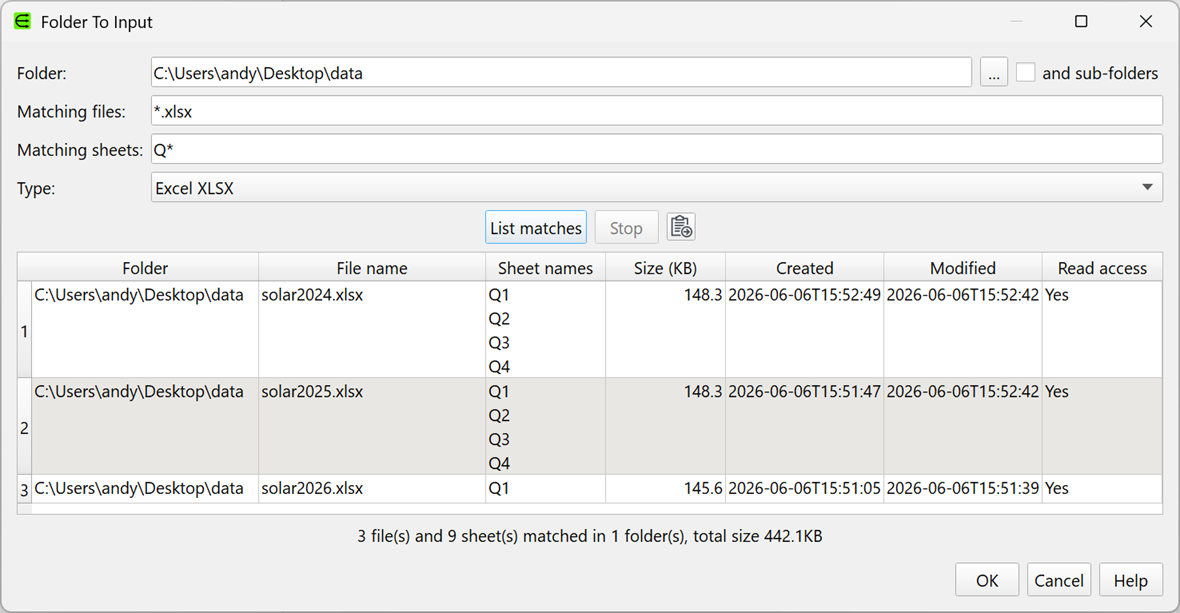
In this window you can specify:
- The Folder to input from. This cannot include wildcards.
- Whether to include sub-folders.
- Matching files as a wildcard, using * and/or ?. Matching is case insensitive.
- Matching sheets as a wildcard, using * and/or ?. Matching is case insensitive. For Excel files only.
- The file Type.
Click List matches to list the matching files/sheets in the order they will be read. This only lists the files/sheets, it does not read them in. Click Stop to halt the listing.
Click the Copy button to copy the listed matches to the clipboard. You can click From Clipboard to input this as a dataset.
The files are traversed in alphabetical order in each folder, before doing a depth first traverse of any sub-folders. Circular symbolic links should not cause a problem.
All files should be of the same type e.g. all CSV files.
If the files have different numbers of columns, they will be aligned (stacked) by column position by default. If you want to align by column names in each file, you can set a Schema. You will be warned if header names or the number of columns differ between files.
Ignore Empty columns will only be applied after all files have been read.
You can also specify folder input from the command line and in batch processing.
See also our how to combine multiple CSV files into one video.
Thanks to Olaf W for help with testing this feature.
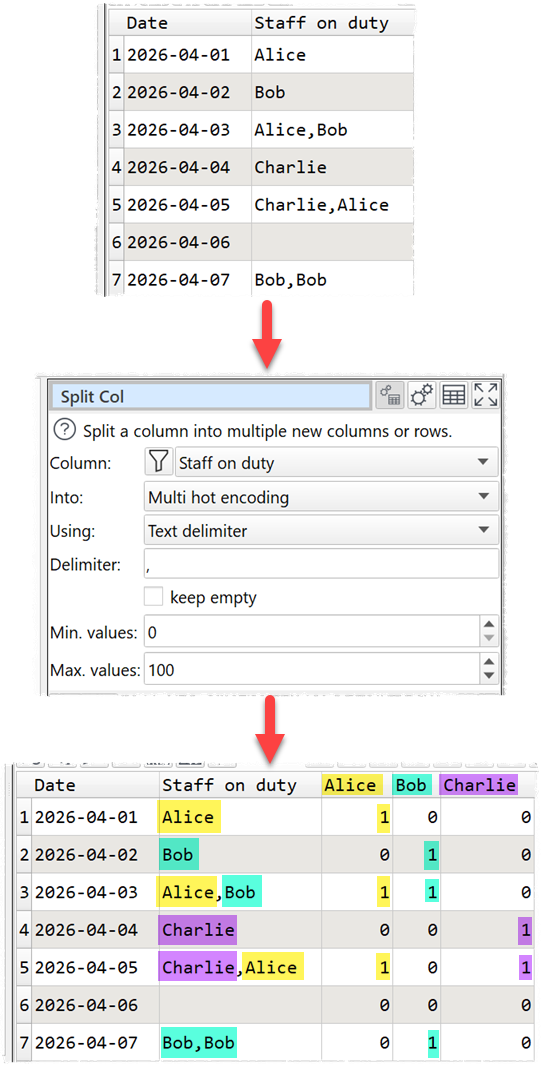
2. The option previously named as One hot encoding in v2.13.0 is now named Multi hot encoding (to better reflect common usage).
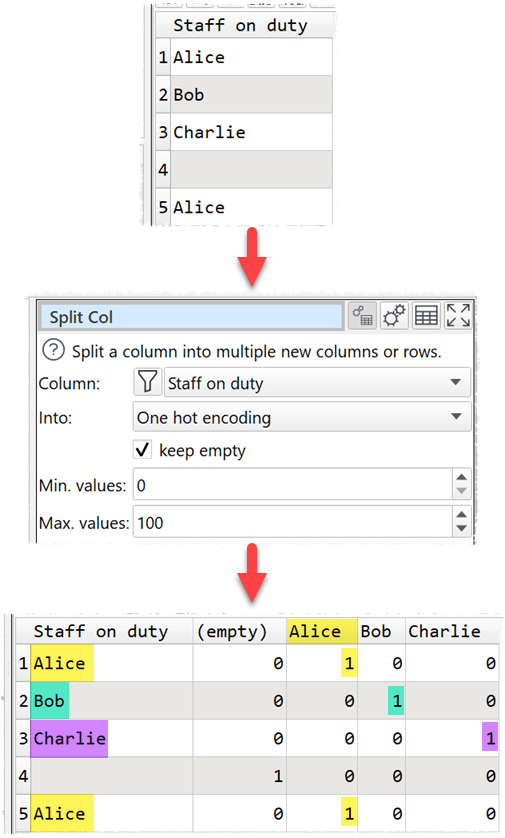
A new One hot encoding option has been added.
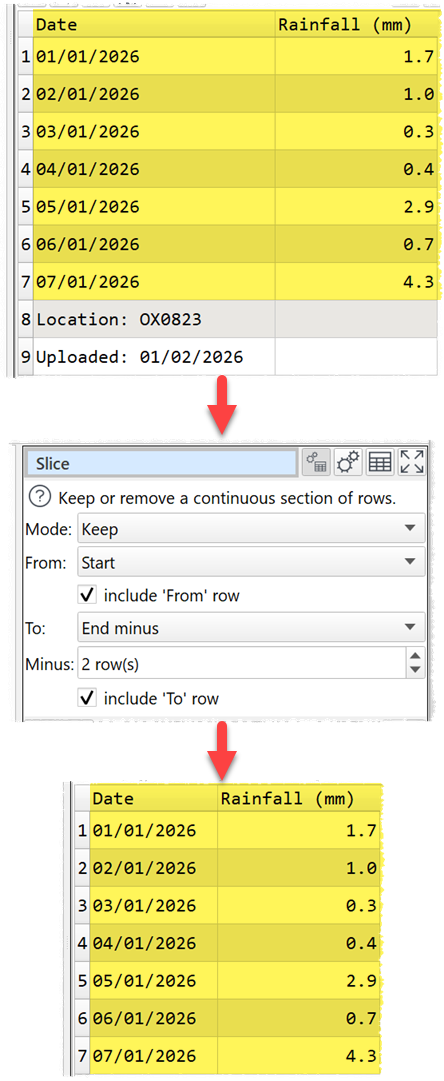
3. The Slice transform has an additional From option (Start plus) and additional To option (End minus). This allows you to start and/or end slices a certain number of rows from the top or bottom of the dataset, even when you don’t know the number of rows in the dataset. For example, you can easily remove the last 2 (footer) rows of a dataset:
4. $(FolderPath) is now available in the Meta Information window.
5. {<input alias>.lastfolder} is now available as a file name variable.
6. Previously Meta Infomation was added before any Schema was applied. However this led to some awkward edge cases. So Meta Information is now added after any Schema. This could possibly change the results of some .transform files where the Meta Infomation column is included in the Schema.
7. When you drag files or folders from Windows Explorer (Windows), Finder (Mac) or similar, Easy Data Transform now immediately releases the application dragged from.
8. The automatic assignment of column widths has been improved for fixed column width files.
9. Errors no longer cascade downstream. This makes it easier to see the source of the error.
 Windows Download
 Mac Download